Hero Section — PC, Tablet & Mobile
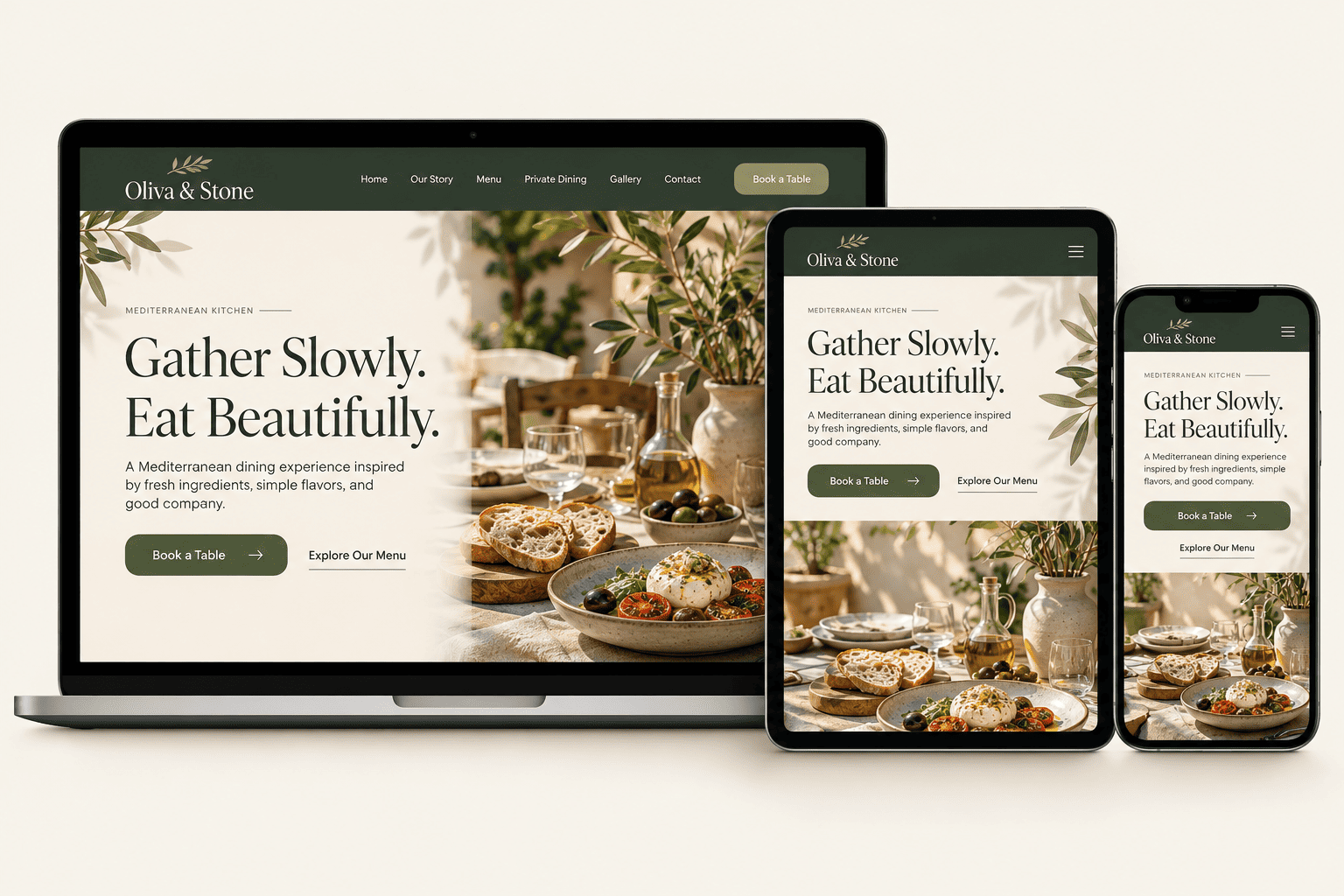
This blueprint focuses on the Oliva & Stone Hero Section only. The reference image should show the same section adapted for desktop, tablet, and mobile in one composed mockup. Replace the image URL below with your hosted mockup image.
Design Specification
A single-section implementation guide for recreating the Oliva & Stone hero area in Elementor while preserving its visual hierarchy and responsive behavior.
Section purpose
Introduce the restaurant’s personality, communicate the dining promise, and direct visitors toward booking or viewing the menu.
Primary audience
Visitors deciding whether the restaurant’s atmosphere and food style match the experience they want.
Content hierarchy
Brand/navigation → cuisine eyebrow → headline → supporting paragraph → primary and secondary CTA → hero photography.
Responsive goal
Keep the message readable at every width, prevent horizontal overflow, and preserve a clear primary action on touch screens.
Brand Foundation
The restaurant concept uses a restrained Mediterranean palette. These colors belong to Oliva & Stone—not to The Blue Anchors article interface.
#344538#263329#A2AA91#D8C3A7#F8F5ED#292A25Copy all brand color tokens
:root {
  --color-brand-olive: #344538;
  --color-brand-deep: #263329;
  --color-brand-sage: #A2AA91;
  --color-brand-stone: #D8C3A7;
  --color-canvas: #F8F5ED;
  --color-text: #292A25;
}Type System
Use an expressive serif for the hero headline and a clean sans-serif for navigation, body copy, and controls.
Eat Beautifully.
Playfair Display
Hero headline and editorial display text.
Desktop 64px · Tablet 48px · Mobile 38pxInter
Navigation, supporting text, buttons, and utility labels.
Body 16–17px · UI 14–15pxLayout Rules
These are recommended starting values. Compare them with the approved mockup and adjust where the rendered design requires it.
| Rule | Desktop · 1440px | Tablet · 768px | Mobile · 375px |
|---|---|---|---|
| Content width | Max 1200px | Full width with 22px side padding | Full width with 16px side padding |
| Hero layout | Two-column editorial split | Two columns if copy remains readable; otherwise stack | Single column, text before image |
| Column ratio | 52% text / 48% image | 50% / 50% or stacked | 100% / 100%, stacked |
| Column gap | 36px | 22px | 20px |
| Section padding | 56px 24px | 36px 22px | 28px 16px |
| CTA layout | Buttons inline | Inline if space allows | Stacked or full-width buttons |
| Image behavior | Cover crop, focal point protects key food detail | Cover crop, recheck focal point | Full width, 4:3 crop recommended |
Responsive reminder: The breakpoint labels are reference widths, not a claim that every device uses exactly that viewport. Check intermediate widths too, including 320px, 390px, 640px, 1024px, and 1280px.
Website Design Breakdown & Elementor Settings
This article covers one section only. Each element below includes its Elementor widget, recommended values by device, and copyable settings and CSS.
Hero Container
Elementor element: Container. Holds the hero text column and hero image column.
Desktop: row · Tablet: row or stack based on available width · Mobile: column.
Container settings
Content width: 1200px max
Desktop: direction row; columns 52% / 48%; gap 36px; align-items center; padding 56px 24px
Tablet: gap 22px; padding 36px 22px; stack columns if either column becomes too narrow
Mobile: direction column; gap 20px; padding 28px 16px
Width: 100%; min-width: 0; overflow-wrap: anywhere
Recommended starting settings; verify against the approved mockup.
.oliva-hero {
  width: min(100%, 1200px);
  margin-inline: auto;
  padding: 56px 24px;
  display: grid;
  grid-template-columns: minmax(0, 1.04fr) minmax(0, .96fr);
  gap: 36px;
  align-items: center;
  background: #F8F5ED;
}
.oliva-hero__content { min-width: 0; }
.oliva-hero__eyebrow {
  margin: 0 0 14px;
  color: #6E7656;
  font: 800 11px/1.4 Inter, sans-serif;
  letter-spacing: 2px;
  text-transform: uppercase;
}
.oliva-hero__title {
  max-width: 650px;
  margin: 0 0 18px;
  color: #263329;
  font-family: "Playfair Display", Georgia, serif;
  font-size: clamp(38px, 4.5vw, 64px);
  line-height: 1.06;
  font-weight: 600;
}
.oliva-hero__copy {
  max-width: 440px;
  margin: 0 0 24px;
  color: #526176;
  font: 400 17px/1.7 Inter, sans-serif;
}
.oliva-hero__actions { display: flex; flex-wrap: wrap; gap: 12px; }
.oliva-hero__button {
  display: inline-flex;
  align-items: center;
  justify-content: center;
  min-height: 48px;
  padding: 16px 28px;
  border: 1px solid #344538;
  border-radius: 8px;
  background: #344538;
  color: #fff;
  font: 600 15px/1.2 Inter, sans-serif;
  text-decoration: none;
  text-align: center;
  transition: background-color 180ms ease, transform 180ms ease;
}
.oliva-hero__button:hover { background: #263329; transform: translateY(-1px); color: #fff; }
.oliva-hero__button:focus-visible { outline: 3px solid #0879E8; outline-offset: 3px; }
.oliva-hero__button--secondary { background: transparent; color: #263329; }
.oliva-hero__button--secondary:hover { background: #ece8dc; color: #263329; }
.oliva-hero__media { min-width: 0; }
.oliva-hero__image {
  display: block;
  width: 100%;
  height: 100%;
  max-height: 560px;
  aspect-ratio: 1.2 / 1;
  object-fit: cover;
  object-position: center;
  border-radius: 12px;
}
@media (max-width: 1024px) {
  .oliva-hero { gap: 22px; padding: 36px 22px; }
  .oliva-hero__title { font-size: clamp(40px, 5vw, 48px); }
  .oliva-hero__copy { font-size: 16px; line-height: 1.65; }
  .oliva-hero__image { aspect-ratio: 4 / 3; }
}
@media (max-width: 767px) {
  .oliva-hero {
    grid-template-columns: minmax(0, 1fr);
    gap: 20px;
    padding: 28px 16px;
  }
  .oliva-hero__title { font-size: 38px; line-height: 1.1; }
  .oliva-hero__copy { font-size: 16px; line-height: 1.65; }
  .oliva-hero__actions { flex-direction: column; align-items: stretch; }
  .oliva-hero__button { width: 100%; padding: 14px 20px; font-size: 14px; }
  .oliva-hero__image { aspect-ratio: 4 / 3; max-height: none; }
}
@media (prefers-reduced-motion: reduce) {
  .oliva-hero__button { transition: none; }
}Hero Eyebrow, Heading & Supporting Copy
Elementor elements: Heading and Text Editor. Keep the headline line length controlled so it remains readable on small screens.
Typography settings
Eyebrow: Inter 11px; weight 800; letter spacing 2px; uppercase; color #6E7656
Heading: Playfair Display; weight 600; color #263329; max-width 650px
Desktop: 64px; line-height 1.05
Tablet: 48px; line-height 1.08
Mobile: 38px; line-height 1.1
Supporting copy: Inter; desktop 17px/1.7; tablet/mobile 16px/1.65; max-width 440px; color #526176
Heading margins: 14px 0 18px; paragraph margin-bottom 24px
Recommended starting settings; confirm visually at each viewport.
.oliva-hero {
  width: min(100%, 1200px);
  margin-inline: auto;
  padding: 56px 24px;
  display: grid;
  grid-template-columns: minmax(0, 1.04fr) minmax(0, .96fr);
  gap: 36px;
  align-items: center;
  background: #F8F5ED;
}
.oliva-hero__content { min-width: 0; }
.oliva-hero__eyebrow {
  margin: 0 0 14px;
  color: #6E7656;
  font: 800 11px/1.4 Inter, sans-serif;
  letter-spacing: 2px;
  text-transform: uppercase;
}
.oliva-hero__title {
  max-width: 650px;
  margin: 0 0 18px;
  color: #263329;
  font-family: "Playfair Display", Georgia, serif;
  font-size: clamp(38px, 4.5vw, 64px);
  line-height: 1.06;
  font-weight: 600;
}
.oliva-hero__copy {
  max-width: 440px;
  margin: 0 0 24px;
  color: #526176;
  font: 400 17px/1.7 Inter, sans-serif;
}
.oliva-hero__actions { display: flex; flex-wrap: wrap; gap: 12px; }
.oliva-hero__button {
  display: inline-flex;
  align-items: center;
  justify-content: center;
  min-height: 48px;
  padding: 16px 28px;
  border: 1px solid #344538;
  border-radius: 8px;
  background: #344538;
  color: #fff;
  font: 600 15px/1.2 Inter, sans-serif;
  text-decoration: none;
  text-align: center;
  transition: background-color 180ms ease, transform 180ms ease;
}
.oliva-hero__button:hover { background: #263329; transform: translateY(-1px); color: #fff; }
.oliva-hero__button:focus-visible { outline: 3px solid #0879E8; outline-offset: 3px; }
.oliva-hero__button--secondary { background: transparent; color: #263329; }
.oliva-hero__button--secondary:hover { background: #ece8dc; color: #263329; }
.oliva-hero__media { min-width: 0; }
.oliva-hero__image {
  display: block;
  width: 100%;
  height: 100%;
  max-height: 560px;
  aspect-ratio: 1.2 / 1;
  object-fit: cover;
  object-position: center;
  border-radius: 12px;
}
@media (max-width: 1024px) {
  .oliva-hero { gap: 22px; padding: 36px 22px; }
  .oliva-hero__title { font-size: clamp(40px, 5vw, 48px); }
  .oliva-hero__copy { font-size: 16px; line-height: 1.65; }
  .oliva-hero__image { aspect-ratio: 4 / 3; }
}
@media (max-width: 767px) {
  .oliva-hero {
    grid-template-columns: minmax(0, 1fr);
    gap: 20px;
    padding: 28px 16px;
  }
  .oliva-hero__title { font-size: 38px; line-height: 1.1; }
  .oliva-hero__copy { font-size: 16px; line-height: 1.65; }
  .oliva-hero__actions { flex-direction: column; align-items: stretch; }
  .oliva-hero__button { width: 100%; padding: 14px 20px; font-size: 14px; }
  .oliva-hero__image { aspect-ratio: 4 / 3; max-height: none; }
}
@media (prefers-reduced-motion: reduce) {
  .oliva-hero__button { transition: none; }
}Primary & Secondary CTA Buttons
Elementor element: Button. Use “Book a Table” as the primary action and “Explore Our Menu” as the secondary action.
Button settings
Font: Inter 15px desktop/tablet; 14px mobile; weight 600
Text: #FFFFFF; background: #344538; hover background: #263329
Padding: desktop 16px 28px; tablet 15px 24px; mobile 14px 20px
Minimum height: 48px; border radius: 8px; border: 1px solid #344538
Transition: 180ms ease; hover lift: translateY(-1px) only if subtle
Focus-visible: 3px outline with offset; do not remove keyboard focus
Secondary button: transparent/ivory background; text #263329; 1px solid #344538
Mobile: stack buttons or set width 100% if side-by-side buttons become cramped.
.oliva-hero {
  width: min(100%, 1200px);
  margin-inline: auto;
  padding: 56px 24px;
  display: grid;
  grid-template-columns: minmax(0, 1.04fr) minmax(0, .96fr);
  gap: 36px;
  align-items: center;
  background: #F8F5ED;
}
.oliva-hero__content { min-width: 0; }
.oliva-hero__eyebrow {
  margin: 0 0 14px;
  color: #6E7656;
  font: 800 11px/1.4 Inter, sans-serif;
  letter-spacing: 2px;
  text-transform: uppercase;
}
.oliva-hero__title {
  max-width: 650px;
  margin: 0 0 18px;
  color: #263329;
  font-family: "Playfair Display", Georgia, serif;
  font-size: clamp(38px, 4.5vw, 64px);
  line-height: 1.06;
  font-weight: 600;
}
.oliva-hero__copy {
  max-width: 440px;
  margin: 0 0 24px;
  color: #526176;
  font: 400 17px/1.7 Inter, sans-serif;
}
.oliva-hero__actions { display: flex; flex-wrap: wrap; gap: 12px; }
.oliva-hero__button {
  display: inline-flex;
  align-items: center;
  justify-content: center;
  min-height: 48px;
  padding: 16px 28px;
  border: 1px solid #344538;
  border-radius: 8px;
  background: #344538;
  color: #fff;
  font: 600 15px/1.2 Inter, sans-serif;
  text-decoration: none;
  text-align: center;
  transition: background-color 180ms ease, transform 180ms ease;
}
.oliva-hero__button:hover { background: #263329; transform: translateY(-1px); color: #fff; }
.oliva-hero__button:focus-visible { outline: 3px solid #0879E8; outline-offset: 3px; }
.oliva-hero__button--secondary { background: transparent; color: #263329; }
.oliva-hero__button--secondary:hover { background: #ece8dc; color: #263329; }
.oliva-hero__media { min-width: 0; }
.oliva-hero__image {
  display: block;
  width: 100%;
  height: 100%;
  max-height: 560px;
  aspect-ratio: 1.2 / 1;
  object-fit: cover;
  object-position: center;
  border-radius: 12px;
}
@media (max-width: 1024px) {
  .oliva-hero { gap: 22px; padding: 36px 22px; }
  .oliva-hero__title { font-size: clamp(40px, 5vw, 48px); }
  .oliva-hero__copy { font-size: 16px; line-height: 1.65; }
  .oliva-hero__image { aspect-ratio: 4 / 3; }
}
@media (max-width: 767px) {
  .oliva-hero {
    grid-template-columns: minmax(0, 1fr);
    gap: 20px;
    padding: 28px 16px;
  }
  .oliva-hero__title { font-size: 38px; line-height: 1.1; }
  .oliva-hero__copy { font-size: 16px; line-height: 1.65; }
  .oliva-hero__actions { flex-direction: column; align-items: stretch; }
  .oliva-hero__button { width: 100%; padding: 14px 20px; font-size: 14px; }
  .oliva-hero__image { aspect-ratio: 4 / 3; max-height: none; }
}
@media (prefers-reduced-motion: reduce) {
  .oliva-hero__button { transition: none; }
}Hero Image
Elementor element: Image. Choose a licensed restaurant/food photograph with a clear focal point and enough crop flexibility for mobile.
Image settings
Width: 100%; max-width: 100%; height auto or controlled aspect ratio
Desktop aspect ratio: around 1.2:1; tablet: 4:3; mobile: 4:3
Object fit: cover; object position: adjust focal point after preview
Border radius: 12px; no forced fixed height on narrow mobile screens
Image size: use a responsive WordPress image size; compress before upload
Alt text: describe the actual image content, not keyword stuffing
Recommended starting settings; final crop depends on the chosen source image.
Site Header & Navigation
Use the existing site header or Elementor Theme Builder header. Do not rebuild a second header inside the hero content if the site template already provides one.
Header integration settings
Header: use the approved global/site header
Desktop: logo left, navigation centered/right, booking CTA at right
Tablet/mobile: collapse navigation to an accessible menu toggle
Logo width: 180px desktop; 150px tablet; 135px mobile (starting values)
Header padding: 18px 24px desktop; 16px 22px tablet; 12px 16px mobile
Mobile menu button: at least 44×44px touch target
Do not place global header CSS in this article HTML.
The Asset Vault
Find the combined asset pack and matching code resources for building this hero section. The asset pack groups hero photography, logo/icon files, and supporting icons together; the HTML and CSS snippets are designed to work together.
ASSET PACK
Hero Section Asset Pack
Hero photography, logo/olive branch mark, and supporting icons in one collection.
Open Asset PackHero CSS Starter
Complete responsive styles for the same hero markup and visual settings described in this guide.
.oliva-hero {
  width: min(100%, 1200px);
  margin-inline: auto;
  padding: 56px 24px;
  display: grid;
  grid-template-columns: minmax(0, 1.04fr) minmax(0, .96fr);
  gap: 36px;
  align-items: center;
  background: #F8F5ED;
}
.oliva-hero__content { min-width: 0; }
.oliva-hero__eyebrow {
  margin: 0 0 14px;
  color: #6E7656;
  font: 800 11px/1.4 Inter, sans-serif;
  letter-spacing: 2px;
  text-transform: uppercase;
}
.oliva-hero__title {
  max-width: 650px;
  margin: 0 0 18px;
  color: #263329;
  font-family: "Playfair Display", Georgia, serif;
  font-size: clamp(38px, 4.5vw, 64px);
  line-height: 1.06;
  font-weight: 600;
}
.oliva-hero__copy {
  max-width: 440px;
  margin: 0 0 24px;
  color: #526176;
  font: 400 17px/1.7 Inter, sans-serif;
}
.oliva-hero__actions { display: flex; flex-wrap: wrap; gap: 12px; }
.oliva-hero__button {
  display: inline-flex;
  align-items: center;
  justify-content: center;
  min-height: 48px;
  padding: 16px 28px;
  border: 1px solid #344538;
  border-radius: 8px;
  background: #344538;
  color: #fff;
  font: 600 15px/1.2 Inter, sans-serif;
  text-decoration: none;
  text-align: center;
  transition: background-color 180ms ease, transform 180ms ease;
}
.oliva-hero__button:hover { background: #263329; transform: translateY(-1px); color: #fff; }
.oliva-hero__button:focus-visible { outline: 3px solid #0879E8; outline-offset: 3px; }
.oliva-hero__button--secondary { background: transparent; color: #263329; }
.oliva-hero__button--secondary:hover { background: #ece8dc; color: #263329; }
.oliva-hero__media { min-width: 0; }
.oliva-hero__image {
  display: block;
  width: 100%;
  height: 100%;
  max-height: 560px;
  aspect-ratio: 1.2 / 1;
  object-fit: cover;
  object-position: center;
  border-radius: 12px;
}
@media (max-width: 1024px) {
  .oliva-hero { gap: 22px; padding: 36px 22px; }
  .oliva-hero__title { font-size: clamp(40px, 5vw, 48px); }
  .oliva-hero__copy { font-size: 16px; line-height: 1.65; }
  .oliva-hero__image { aspect-ratio: 4 / 3; }
}
@media (max-width: 767px) {
  .oliva-hero {
    grid-template-columns: minmax(0, 1fr);
    gap: 20px;
    padding: 28px 16px;
  }
  .oliva-hero__title { font-size: 38px; line-height: 1.1; }
  .oliva-hero__copy { font-size: 16px; line-height: 1.65; }
  .oliva-hero__actions { flex-direction: column; align-items: stretch; }
  .oliva-hero__button { width: 100%; padding: 14px 20px; font-size: 14px; }
  .oliva-hero__image { aspect-ratio: 4 / 3; max-height: none; }
}
@media (prefers-reduced-motion: reduce) {
  .oliva-hero__button { transition: none; }
}HTML Structure
Matching HTML structure for the CSS above, including headline, description, buttons, and hero image.
<section class="oliva-hero" aria-labelledby="oliva-hero-title">
  <div class="oliva-hero__content">
    <p class="oliva-hero__eyebrow">Mediterranean Cuisine</p>
    <h1 id="oliva-hero-title" class="oliva-hero__title">Gather Slowly. Eat Beautifully.</h1>
    <p class="oliva-hero__copy">A Mediterranean dining experience inspired by fresh ingredients, timeless flavors, and the joy of good company.</p>
    <div class="oliva-hero__actions">
      <a class="oliva-hero__button" href="#reservations">Book a Table</a>
      <a class="oliva-hero__button oliva-hero__button--secondary" href="#menu">Explore Our Menu</a>
    </div>
  </div>
  <div class="oliva-hero__media">
    <img class="oliva-hero__image" src="PASTE_HERO_IMAGE_URL_HERE" alt="Mediterranean dishes arranged on a sunlit restaurant terrace" width="1200" height="1000" loading="eager" fetchpriority="high">
  </div>
</section>JavaScript
Optional script for smooth scrolling to the reservation and menu sections when those target IDs exist on the page.
(function () {
  const hero = document.querySelector('.oliva-hero');
  if (!hero) return;

  hero.querySelectorAll('a[href^="#"]').forEach(function (link) {
    link.addEventListener('click', function (event) {
      const targetId = link.getAttribute('href').slice(1);
      const target = document.getElementById(targetId);
      if (!target) return;

      event.preventDefault();
      target.scrollIntoView({
        behavior: window.matchMedia('(prefers-reduced-motion: reduce)').matches
          ? 'auto'
          : 'smooth',
        block: 'start'
      });
    });
  });
})();Hero Section Prompt
Copy the same complete prompt used to recreate this hero section with an AI website builder or coding assistant.
Create a polished, responsive hero section for “Oliva & Stone,” an upscale Mediterranean restaurant website. Build ONLY the hero section, not the full homepage. The result should be suitable for implementation in WordPress Elementor or a modern HTML/CSS website builder.

BRAND AND ART DIRECTION
- Brand name: Oliva & Stone
- Tagline/headline: “Gather Slowly. Eat Beautifully.”
- Supporting copy: “A Mediterranean dining experience inspired by fresh ingredients, timeless flavors, and the joy of good company.”
- Style: refined Mediterranean editorial, warm, welcoming, premium, natural, understated, and image-led.
- Color palette: Olive Forest #344538; Deep Olive #263329; Sage #A2AA91; Warm Stone #D8C3A7; Warm Ivory #F8F5ED; Charcoal #292A25.
- Typography: Playfair Display for the main headline; Inter for body copy, navigation, buttons, and small labels. Use readable fallbacks.
- Photography: authentic Mediterranean table setting with olive branches, olive oil, bread, tomatoes, burrata, olives, herbs, ceramics, and warm natural daylight. Use an image the site owner has permission to use.

HERO CONTENT
- Eyebrow label: “MEDITERRANEAN KITCHEN”
- H1: “Gather Slowly. Eat Beautifully.”
- Supporting paragraph: “A Mediterranean dining experience inspired by fresh ingredients, timeless flavors, and the joy of good company.”
- Primary CTA: “Book a Table”
- Secondary CTA: “Explore Our Menu”
- Use a clear, attractive hierarchy and generous whitespace.

LAYOUT AND RESPONSIVENESS
- Desktop: centered max-width container around 1200px; two-column layout with text on the left and a large, high-quality hero image on the right; vertically align content and image.
- Tablet: reduce gaps and padding; preserve the two-column layout only when the text remains comfortable to read, otherwise stack.
- Mobile: stack content and image, keep the headline legible without horizontal overflow, and make CTA buttons easy to tap. Use responsive typography with clamp() or equivalent.
- Test at 1440px, 1024px, 768px, 390px, 375px, and 320px.
- Use semantic HTML, a single clear H1, descriptive image alt text, visible keyboard focus, sufficient color contrast, and touch targets around 44–48px or larger.

IMPLEMENTATION REQUIREMENTS
- Provide clean, scoped HTML and CSS for this hero section only. Use the .oliva-hero class namespace so the styles do not affect the site header, footer, sidebar, or other page sections.
- Do not create or duplicate the global website header. If a brand label is included inside the hero, keep it part of the hero only.
- Use real CTA destinations when known. Otherwise use clearly identifiable temporary anchors such as #reservations and #menu, and explain that they must be connected to real destinations before publishing.
- Keep JavaScript optional. The basic layout and CTA links should work without custom JavaScript; only provide a small script if it adds a genuine interaction.
- Avoid frameworks, paid APIs, unnecessary animations, and external dependencies beyond the specified fonts and image assets. Respect prefers-reduced-motion.
- Match the documented Oliva & Stone palette, copy, and editorial style. Do not add unrelated sections or invent extra promotional offers.

DELIVERABLE
Return the complete hero-section HTML and CSS in separate copyable code blocks, followed by concise Elementor implementation notes and a short responsive/accessibility checklist. If JavaScript is unnecessary, state that it is optional rather than inventing functionality.
How to Build This Hero Section in Elementor
Follow these steps to recreate the layout with Elementor containers and standard widgets.
- Create the main container. Set its content width to a maximum of 1200px, use a two-column layout on desktop, and align the columns vertically in the center.
- Add the text container. Place the eyebrow label, main Heading widget, supporting paragraph, and a nested container for the two CTA buttons.
- Style the heading and paragraph. Use Playfair Display for the headline and Inter for supporting text. Set responsive font sizes individually for desktop, tablet, and mobile.
- Add the CTA buttons. Use a solid olive primary button and an outlined secondary button. Give both a minimum touch height of 48px and a visible keyboard-focus state.
- Add the hero image. Use the Image widget, set its width to 100%, choose a suitable crop, and check that the important part of the photo remains visible at narrower widths.
- Adjust tablet and mobile layouts. Reduce the gap and padding on tablet. On mobile, stack the text and image, set buttons to full width if needed, and prevent any horizontal overflow.
- Connect the real destinations. Link the primary CTA to the actual reservation page or booking service and the secondary CTA to the menu section/page. Do not use placeholder anchors on a live site.
- Preview before publishing. Test at 1440px, 1024px, 768px, 390px, 375px, and 320px. Confirm the global site header is not duplicated and the post sidebar remains unaffected.
Accessibility & Performance Notes
- Use a single clear H1 for the hero headline when this is the page’s main heading.
- Write useful alt text for meaningful photography; use empty alt text only for purely decorative images.
- Maintain readable contrast between text, buttons, and the background.
- Keep keyboard focus visible and ensure buttons have comfortable touch targets.
- Compress the hero image and use responsive image sizes supported by WordPress.
- Load only the fonts and scripts needed by the page; the basic hero layout does not require custom JavaScript.
- Use real, working CTA destinations and verify the mobile menu through the site header implementation.
Final Implementation Checklist
Confirm these points before publishing your finished hero section.
- Use the approved PC/tablet/mobile mockup as the visual reference.
- Confirm the existing site header is not duplicated inside the hero content.
- Check heading wraps and image focal point at 1440px, 1024px, 768px, 390px, 375px, and 320px.
- Confirm both CTA links go to real destinations and the primary action is visually clear.
- Test keyboard focus, color contrast, and touch target sizes.
- Optimize image size and add descriptive alt text.
- Check that the article CSS does not affect the WordPress header, footer, or single-post sidebar.
- Replace every asset URL placeholder with a real, accessible URL or remove that link.
Frequently Asked Questions
Quick answers to common questions about building and adapting this hero section.
Can I build this hero section using Elementor Free?
Yes. The basic layout can be assembled with Containers, Heading, Text Editor, Image, and Button widgets where those features are available in your Elementor version. Custom CSS access may depend on your Elementor plan or setup, so use the available site-level stylesheet or a suitable custom CSS method if needed.
Do I need custom JavaScript for this section?
No. The layout, headline, image, and CTA buttons do not require custom JavaScript. Add JavaScript only if you introduce a real interactive feature that cannot be handled by the site builder or existing theme.
How do I make the hero section responsive?
Set separate responsive values for typography, spacing, and layout. Keep two columns on wide screens, then stack the content and image on narrow screens if the text column becomes cramped. Preview at several widths instead of relying on one breakpoint alone.
Can I use a different hero image?
Yes. Choose an image that fits the brand and has enough space around the focal subject for responsive cropping. Use an image you own or have permission to use, optimize its file size, and check the crop on desktop and mobile.
What should the CTA buttons link to?
Connect “Book a Table” to the restaurant’s actual booking page or reservation service, and connect “Explore Our Menu” to the menu page or the relevant menu section. Replace the sample links before publishing.
Will the supplied HTML and CSS look exactly like every mockup?
The snippets provide a matching starting implementation for the documented structure and settings. The final appearance still depends on the selected image, loaded fonts, Elementor or theme styles, and the actual viewport, so test the finished page before publishing.
Project Notes
Design concept: Oliva & Stone — Mediterranean restaurant hero section.
Implementation focus: Elementor containers and widgets, responsive typography, CTA buttons, and hero photography.
Recommended test widths: 1440px, 1024px, 768px, 390px, 375px, and 320px.
Before launch: Use real image assets, connect real CTA destinations, check licenses, and verify the final layout in the active WordPress theme.